
CCTV System Cost & Budget Guide for Bahrain
A CCTV budget is not a camera count multiplied by a unit price. This guide from MTT — My Telecom Technology — explains the decisions that genuinely move the figure, so you can compare proposals properly and brief a supplier with the information they actually need.
MTT Engineering Guide
Published by MTT — My Telecom Technology, a systems integrator working across Bahrain and Saudi Arabia since 2007. More about MTT.
This guide is vendor-neutral and deliberately does not publish price ranges. Equipment pricing, labour and lead times move, and a number quoted without a defined scope misleads more than it helps. What follows is the structure of a CCTV budget and the decisions that control it.
Start with the operational objective
Every cost decision downstream depends on one question: what must the system allow someone to do? Deterrence, general observation, recognition of a known person, identification of an unknown person and reading a number plate are progressively harder, and each step raises the pixel density required on target.
Write the objective per area rather than per building. A warehouse may need identification at the dock face and cash office, recognition in the aisles, and simple observation across the yard. Specifying the highest standard everywhere is the single most common way a CCTV budget doubles for no operational gain.
Retention is an objective too
Decide how long footage must survive before it is overwritten, and why. Investigations that surface after a monthly stock count need a different retention period from an incident noticed the same day.
Coverage and camera count
Camera count comes from coverage requirements, sightlines and obstructions, not from a rule of thumb. On a real site the count is usually driven by the number of discrete points that must be seen clearly — entrances, tills, cages, docks, gates, lift lobbies, plant rooms — plus the connecting areas that let an incident be followed from one point to another.
- a single well-placed camera often replaces two poorly placed ones;
- height and angle change what a camera can prove, not just what it can see;
- multi-sensor cameras can cover a wide area from one position and one cable;
- PTZ cameras cover distance but see only where they are pointed, so they supplement fixed cameras rather than replace them.
Cameras, lenses and environment
Camera cost is influenced far more by the scene than by the badge on the housing. The variables that matter are sensor performance in the available light, lens choice for the distance to target, dynamic range where a camera faces a bright doorway, and the environmental rating needed for the location.
Where cost is usually added legitimately
- low-light or infrared performance in unlit yards and perimeters;
- wide dynamic range at entrances, loading doors and glazed lobbies;
- corrosion, dust, washdown or temperature ratings for industrial areas;
- vandal resistance in publicly accessible positions;
- thermal cameras where detection in darkness matters more than identification;
- higher resolution only where the required detail genuinely demands it.
Retention, recording and storage
Storage is frequently the second-largest line in a CCTV budget and the one most often underestimated. It is calculated from camera count, resolution, frame rate, codec efficiency, how much movement the scene contains, the recording mode, and the retention period.
Levers that reduce storage without hurting evidence
- frame rates set per area rather than uniformly high;
- event-based or motion-triggered recording in low-activity areas, with continuous recording where a gap would be unacceptable;
- modern compression, understood and tested rather than assumed;
- resolution matched to the target distance instead of specified at maximum;
- shorter retention for general areas and longer retention for sensitive ones, where policy allows.
Redundancy is a separate decision. Whether recording survives a single disk failure, and whether critical footage is archived off the recorder, both change the hardware and the price.
VMS, recorders and licensing
The recording platform sets the ceiling on what the system can do later. Appliance-style recorders are simple and cost-effective for contained sites. Server-based video management software suits larger or multi-site estates, federated viewing, granular permissions and integration with access control and analytics.
Ask for licensing to be itemised: base licences, per-channel licences, analytics or integration modules, client workstations, and any annual software maintenance. A platform that appears cheaper at purchase can carry a recurring cost that only becomes visible at renewal.
Network, cabling and power
On many sites the infrastructure costs more than the cameras. Each camera needs a tested cable run within distance limits, containment, a PoE switch port with sufficient power budget, and space in a cabinet with adequate cooling.
- distances beyond copper limits require fibre and local switching, which adds cabinets and power at remote points;
- external routes need appropriate cable types, ducting and weatherproof enclosures;
- PoE budget must account for heaters, illuminators and PTZ motors, not just the camera itself;
- separating the video network from corporate traffic is normally a design requirement, not an optional extra;
- UPS for cameras, switches and recorders determines whether a power dip becomes a recording gap.
See structured cabling, fibre-optic networks and UPS and critical power for how MTT handles these scopes.
Control room and viewing
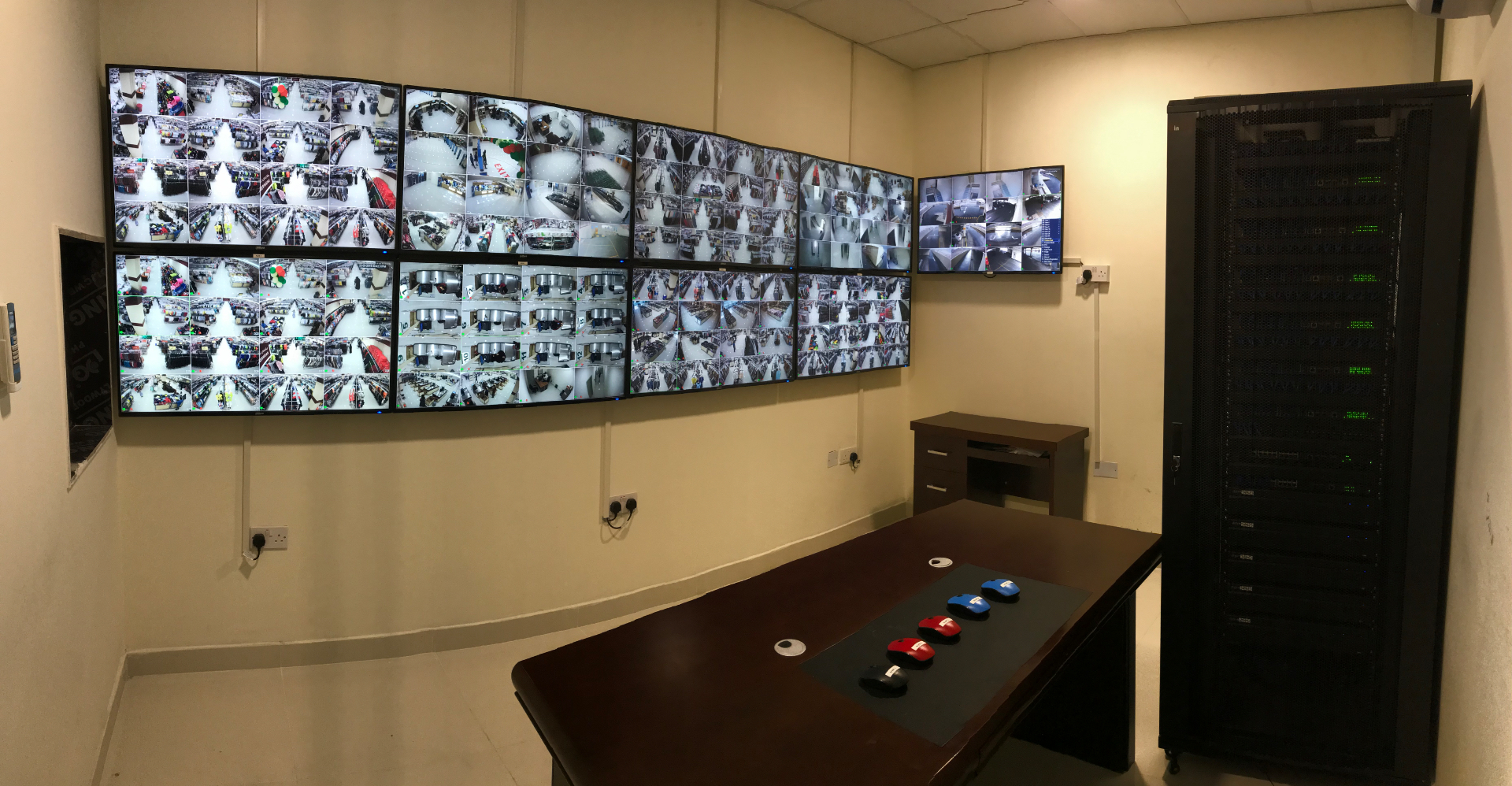
How footage is watched is a design decision with real cost. A single reception monitor is very different from a staffed control room with a video wall, multiple operator positions, dedicated workstations and furniture. Decide who watches, from where, how many streams at once, and what they are expected to do when something happens.
Remote and mobile access should also be defined early, because it affects bandwidth, client licensing, user administration and the cybersecurity requirements below.
Cybersecurity and governance
Cameras are networked computers. Treating them as such costs a little at installation and saves a great deal later: unique credentials rather than defaults, firmware maintained on a schedule, unnecessary services disabled, network segmentation, controlled remote access, and named user accounts with role-based permissions.
Governance belongs in the same section. Who can export footage, how exports are logged, where signage is required and how long data is kept are organisational decisions that shape the technical configuration.
Installation and commissioning
Labour varies more between sites than equipment does. Working at height, occupied premises, out-of-hours access, permits, existing containment and the state of the equipment room all change the effort required. A proposal that does not state its access assumptions is likely to produce variations later.
Commissioning is not a formality. Cable testing, camera focus and field of view verification against the stated objective, recording and retention verification, failure testing and documented handover are what turn an installation into a system you can rely on.
Maintenance and lifecycle
CCTV degrades quietly. Housings get dirty, focus drifts, disks fail, firmware ages and configuration changes go unrecorded — and none of it is noticed until footage is needed. Budget for planned maintenance from the start.
A reasonable lifecycle view covers preventive visits, disk and recorder health, firmware and configuration backup, spares for critical positions, and a replacement horizon for cameras. Our AMC guide sets out how to evaluate maintenance scope properly.
Common budgeting mistakes
- specifying a camera count before agreeing what each camera must achieve;
- applying identification-grade requirements to every area;
- choosing a retention period after the recorder has been ordered;
- omitting containment, cable testing and remote cabinets from the scope;
- ignoring PoE budget, cabinet space and cooling;
- leaving VMS licensing and annual software maintenance out of the comparison;
- no UPS, so power events create recording gaps;
- no cybersecurity provision and no plan for firmware;
- no operator training, so features are never used;
- no maintenance contract, so the system is unreliable by year two.
How MTT prepares a budgetary estimate
- Step 01Objective workshop
We agree what the system must achieve per area, and the retention required, before any equipment is discussed.
- Step 02Site survey
Sightlines, lighting, distances, containment, power and the equipment room are assessed on site.
- Step 03Outline design
Camera positions and types, recording architecture, storage calculation and network requirements are drafted.
- Step 04Bill of quantities
Equipment, licensing, cabling, containment, power and labour are itemised with assumptions stated.
- Step 05Budgetary estimate
A figure with a defined scope, exclusions and options, so it can be compared and approved.
- Step 06Detailed proposal
On approval to proceed, the design is developed with drawings, schedules and a commissioning plan.
Buyer checklist
- Operational objective written per area, not per site
- Required retention period agreed and justified
- Storage calculation shown, with the assumptions behind it
- Camera schedule listing type, lens and mounting per position
- Environmental ratings appropriate to each location
- Cabling, containment and testing included in the scope
- PoE budget, cabinet space and cooling confirmed
- VMS licensing and annual software costs itemised
- UPS provision for cameras, switches and recorders
- Cybersecurity measures and firmware policy stated
- Viewing arrangement and operator positions defined
- Commissioning tests and handover documentation listed
- Training included for operators and administrators
- Maintenance scope, response categories and spares priced
- Exclusions and client-provided items stated clearly
What MTT needs from you
- a site plan or sketch, even a rough one;
- the areas of concern and what each must allow you to do;
- your required retention period, and any policy driving it;
- details of existing cameras, recorders, cabling and switching;
- where an equipment room or cabinet can be located;
- who will watch the system, from where, and out of hours;
- site access constraints, permits and working-hours restrictions;
- your approval timeline and any budget envelope you are working to.
Frequently asked questions
Related MTT capabilities
Sectors where this applies
Get a CCTV budget you can actually rely on.
Send us the site details and we will arrange a survey or prepare a budgetary quotation with the scope and assumptions written down.
Enquiries are handled through the protected MTT enquiry form. Your details are used only to respond to your request.